Fewer Permission Prompts in Claude Code: Turn On the Sandbox
I've been running Claude Code daily for about four months, and for most of that time I just accepted that it stopped to ask before running almost anything. Tests, git, typecheck. I'd approve — and a slightly different version of the same command would ask again.
I told myself that was the cost of doing things safely. Codex CLI, meanwhile, barely interrupted me.
Last week I finally got curious enough to dig in.
A human in the loop, without the babysitting
To be clear: I never run either tool with --dangerously-skip-permissions. I want a human in the loop on anything that touches my machine, so killing the guardrails was never the answer. I even run Claude Code in Auto mode, which is meant to cut down the asking. It helps — but it still doesn't catch enough of the prompts.
It comes down to where each tool draws its trust boundary by default.
Codex is sandbox-first. It runs commands inside an OS-level sandbox, locked to the project folder with no network, and only asks when something tries to escape.
Claude Code is approval-first. It asks before anything that could change state, unless you've pre-approved that exact command.
The aha: an allowlist matches the shape of a command
Add an environment variable, a pipe, or an && chain, and any one piece it doesn't recognize makes the whole command prompt again. Auto mode on and around 250 saved rules deep, I was still getting interrupted constantly. You can't catch up that way.
The fix was already built in
Claude Code has a sandbox too, and turning it on takes two steps:
- Type
/sandboxin your session - On the Mode tab, switch it to auto-allow (the top option)
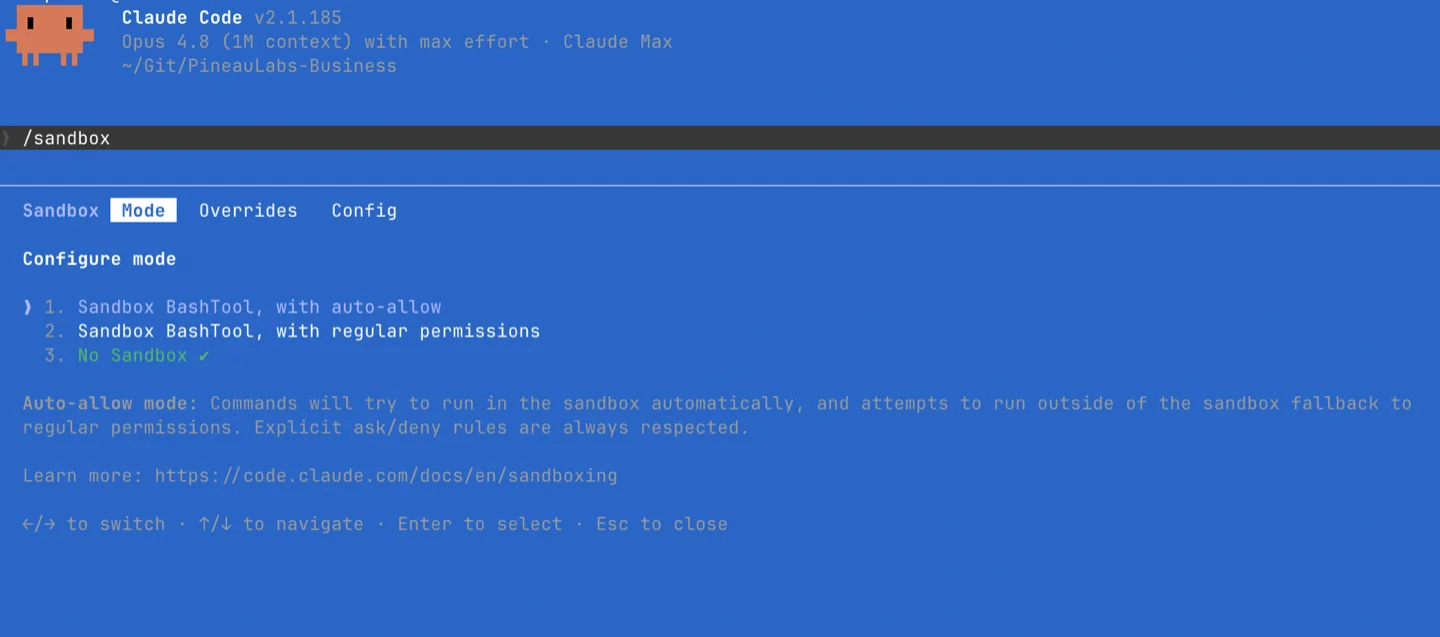
The /sandbox Mode tab — pick option 1, "Sandbox BashTool, with auto-allow."
Leave Auto mode on alongside it (Shift+Tab until you land on Auto mode — not Auto-accept edits, so keep cycling). I already had Auto mode running; the sandbox is what finally made the difference.
That's it. On a Mac it works out of the box. Now it behaves like Codex: contained, quiet, and it only stops me when something genuinely tries to leave the workspace.
The bonus: it's actually more secure
The sandbox now contains the broad execution my allowlist had been quietly waving through anyway — approving a command was never the same as containing it.
Makes a huge difference for me. I don't feel like I'm babysitting prompts anymore.