How I Give AI Agents Context Across 40 Repos
TL;DR
- One shared file: a
CLAUDE.mdin the folder above all my repos holds the preferences that apply everywhere. Claude Code loads it in every repo below.- One line per repo: each repo keeps its instructions in
AGENTS.md, plus aCLAUDE.mdthat just says@AGENTS.md. Without that line, the shared file stops Claude Code from readingAGENTS.md.- Codex too: Codex never looks above the repo, so the shared file is symlinked to
~/.codex/AGENTS.md.- Business stays separate: client notes and plans live in their own repo, read only when a task needs them.
- From my phone: Remote Control on every session, plus Tailscale on my Mac and iPhone, lets me run and review any project from anywhere.
I keep about 40 repos in one folder on my Mac: client work, my own products, and a long tail of experiments. Most days I'm in three or four of them, with Claude Code or Codex doing a lot of the typing, and some of that happens from my phone.
Every agent session starts cold. On its own, the agent doesn't know how I like to work, what the project is, or where the business side lives. So every session gets that context automatically, in three layers, set by where the files sit.
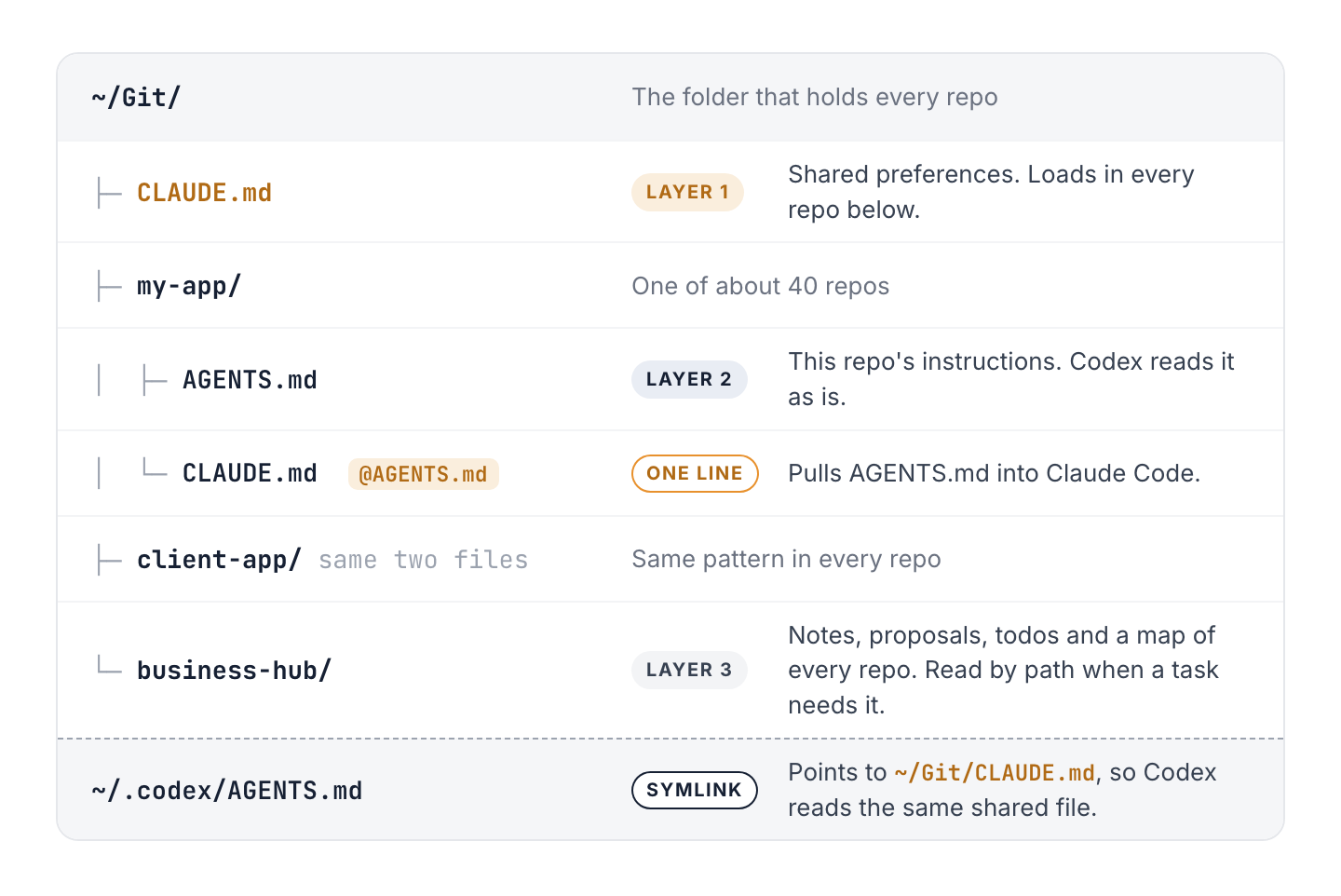
The whole setup: one shared file, two files per repo, and a hub.
Layer 1: one file above every repo
All my repos live under ~/Git, and one file sits right above them: ~/Git/CLAUDE.md.
Claude Code loads the CLAUDE.md in the folder you start it in, plus every folder above it. Start a session in ~/Git/my-app and it reads ~/Git/my-app/CLAUDE.md and ~/Git/CLAUDE.md. Put a file in the parent folder and every repo below picks it up. Nothing to copy around.
Mine holds what's true in every repo. Trimmed, it looks like this:
## Working preferences (all projects)

- Confirm before large design or architecture decisions.
- Suggest a cheaper model for simple or mechanical updates.
- Never run `git stash` without asking first.
- Proactively flag refactor, reuse and cleanup opportunities.

## Business context lives in the hub

Business files and a map of every repo live in ~/Git/PineauLabs-Business.
Read its CLAUDE.md when a task needs business or cross-project context.
The git stash rule is there because I often have more than one agent working at once, and a stash can sweep up another session's work in progress.
The test for this file: if it isn't true for every repo, it doesn't go here. Mine is 22 lines. Anthropic's docs note that files over 200 lines use more context and may be followed less reliably, and a file that loads in 40 repos is the last place to be wordy.
Layer 2: an AGENTS.md in each repo
Each repo has its own instructions: what the project is, how to build, test and run it, its conventions, and how it deploys. That file is the source of truth for that codebase.
I keep it in AGENTS.md, the name Codex and most other agents read. Claude Code reads it too, with one catch that's easy to miss.
The one-line file that makes it work
Claude Code only reads a repo's AGENTS.md on its own when there's no CLAUDE.md in that folder or any folder above it. The shared file from layer 1 counts. So once ~/Git/CLAUDE.md exists, Claude Code reads it and skips the AGENTS.md in every repo below.
The fix is one line. Each repo gets a CLAUDE.md that says:
@AGENTS.md
The @ is an import. Claude Code pulls in the whole AGENTS.md, so every tool reads the same file. Anything that's only for Claude goes below that line.
You could change the Project instructions setting in /config so Claude reads both instead. I prefer the import: it works in every session, including older versions, and anyone who opens the repo can see what's going on.
Layer 3: a separate repo for the business
The third layer is a repo of its own, sitting next to the others: my business hub. It holds what isn't code: client notes, proposals, my todo list, and a map of every repo with what it is and where its instructions live.
It doesn't load in the code repos, on purpose. A coding session doesn't need my proposals, and business details never end up in a repo a client owns. The shared file says where the hub is, so when a task needs that context, the agent reads it by path. For business work, or anything that spans projects, I open the agent in the hub itself, where its own CLAUDE.md and Claude Code's memory for that repo load.
Codex: one file, two places
Codex doesn't look above the repo. It reads a global file in your Codex folder, ~/.codex/AGENTS.md, then the AGENTS.md files from the repo's root down to the folder you're in. So the shared file needs a second home. A symlink keeps it to one copy:
ln -s ~/Git/CLAUDE.md ~/.codex/AGENTS.md
Edit the file once and both tools see the change.
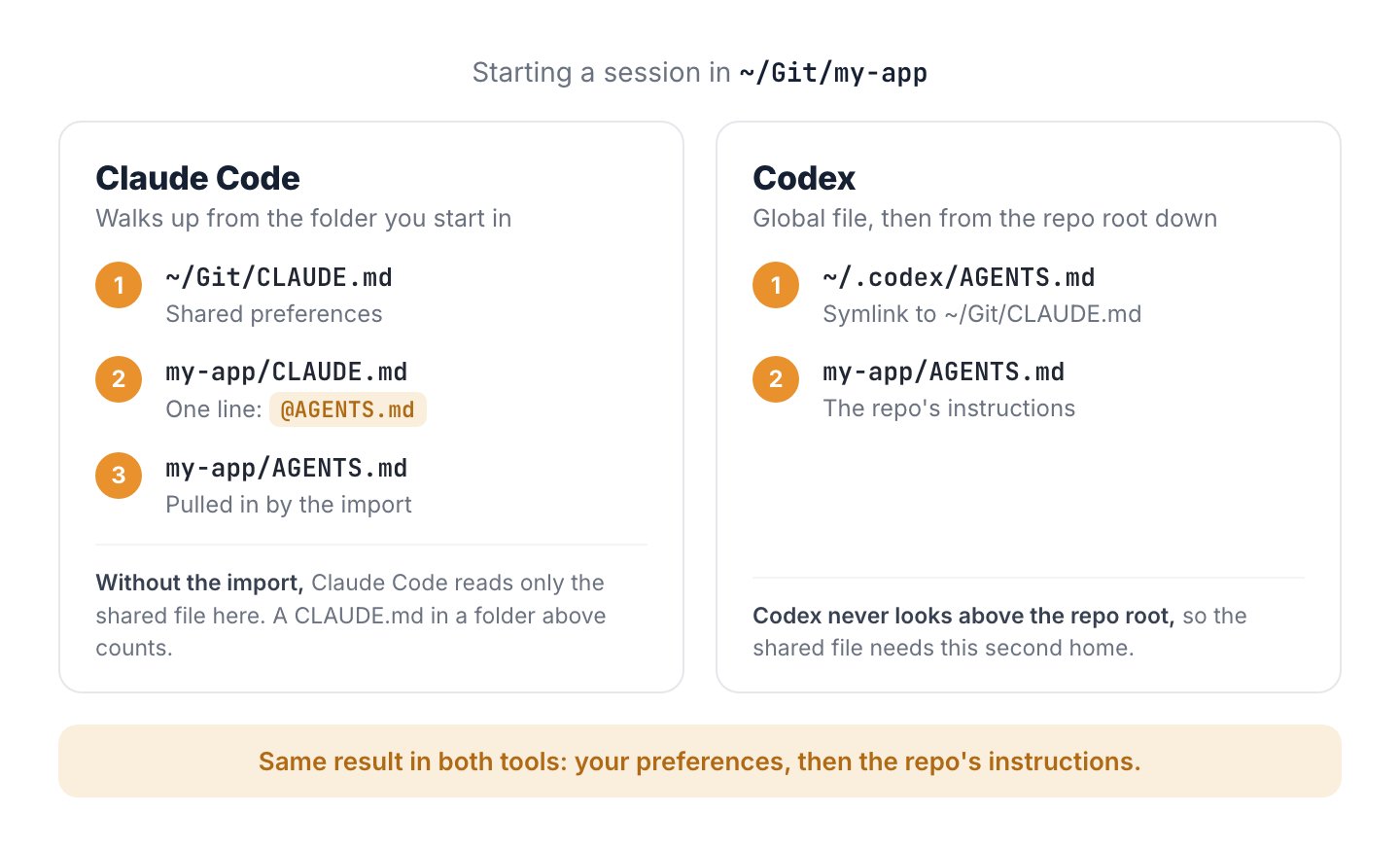
Different paths, same result.
Check that it's working
- Claude Code: run
/context allin a repo and look under Memory files. You should see the shared file and the repo'sAGENTS.md. - Codex: ask it to summarize the instructions it's following. It should repeat your shared preferences and the repo's own instructions.
A prompt to set it up
If your repos already have a mix of CLAUDE.md and AGENTS.md files, start Claude Code in the folder that holds them and paste this:
My code repos all live in this folder. Set them up so every AI coding session starts with the right context. Show me your plan before you change anything.

1. For each repo, list which instruction files it has: AGENTS.md, CLAUDE.md, both, or neither.
2. Find the working preferences that are the same in every repo, and draft a short CLAUDE.md for this folder with just those. Claude Code loads it in every repo below.
3. Give every repo one shared file of its own: AGENTS.md, which Codex and most other tools read. If a repo only has CLAUDE.md, plan to move its contents to AGENTS.md.
4. Next to every AGENTS.md, plan a CLAUDE.md whose only line is @AGENTS.md. Claude Code stops reading AGENTS.md by itself once this folder has a CLAUDE.md, and the import brings it back.
5. List the lines in each repo's file that the shared file would make repeats, but don't remove them unless I say so.

Wait for my OK before editing anything.
It lays out the plan and waits for your OK before it changes anything. The shared file sits outside every repo, so git doesn't track it. Keep a copy somewhere you back up.
Every project, from my phone
The layers mean any session starts with the right context. Remote Control means I can reach those sessions from anywhere.
I have Remote Control on for every session: in Claude Code, run /config and turn on Enable Remote Control for all sessions.
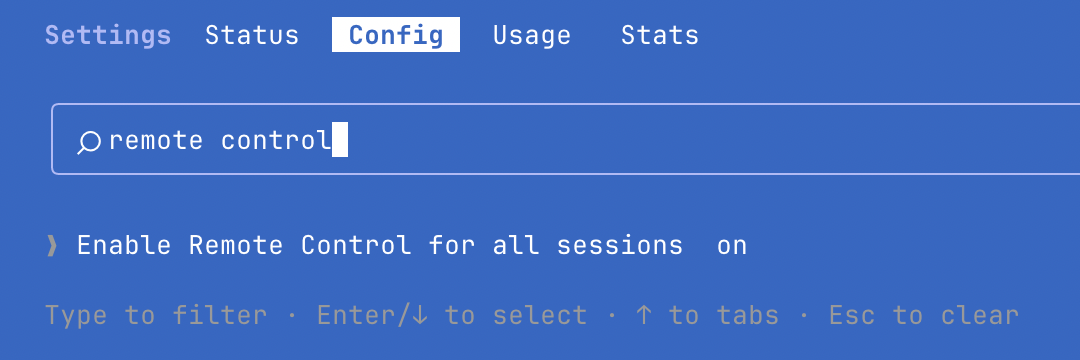
Search /config for "remote control" and turn it on.
Then I start one Claude Code session for each major project and name it after the project with /rename. Every one of them shows up in the Claude app on my iPhone, so when I'm away from my desk I open the project I want and send it a prompt.
The work still runs on my Mac, in the real development environment, with the same files, tools and context as if I were sitting there. The phone is just a window into the session. Claude can also send a notification to my phone when a long task finishes or it needs a decision from me.
A few things to know:
- The Mac has to stay on and the sessions have to keep running. If it sleeps, they reconnect when it wakes up.
- Your Mac only makes outbound connections. Nothing opens a port.
- It needs a Claude subscription (Pro or higher), not an API key.
Seeing the work, not just the chat
Reading a diff on a phone only goes so far. When I'm reviewing work I want to click through the app itself, so Tailscale runs on both my Mac and my iPhone. It puts my devices on a private network, and tailscale serve shares a dev server with my own devices only:
tailscale serve --bg 3000
That gives the Mac a private HTTPS address like https://your-mac.your-tailnet.ts.net that opens whatever is running on port 3000, from wherever I am, with nothing deployed. It keeps serving in the background until you turn it off with tailscale serve reset.
Three things to know:
- Your dev server may refuse the new address. Vite, for one, only answers to localhost by default. Add your Mac's exact tailnet name to
server.allowedHosts, just yours and not all of.ts.net. - An iPhone runs one VPN at a time, so switch off any other VPN app while you use Tailscale.
- Serve keeps the app private to your devices. Funnel is the public version, and Tailscale offers it when you first turn Serve on. Leave it off unless you mean to put the app on the internet.
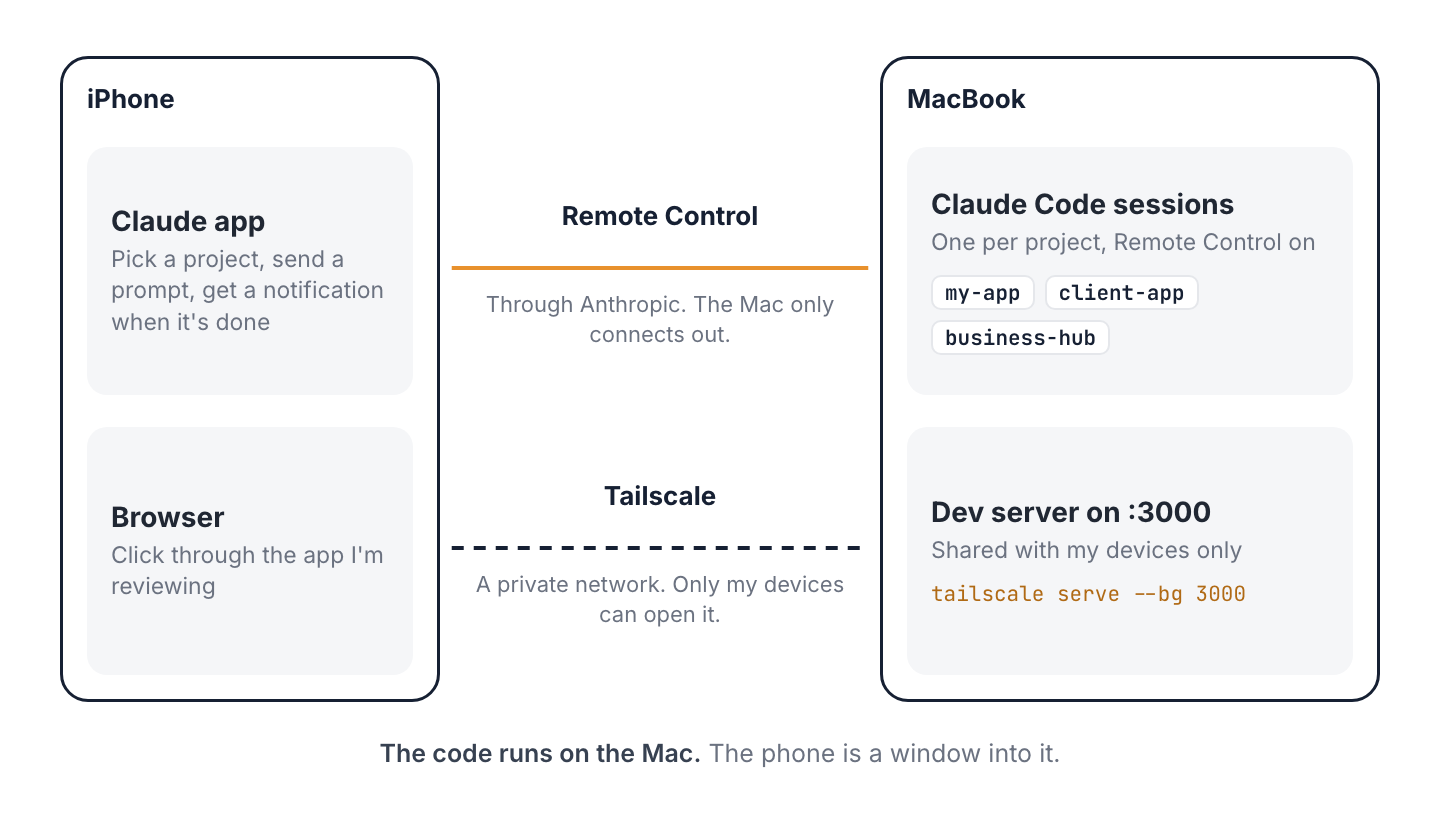
Two connections: Remote Control for the sessions, Tailscale for the running app.
Makes a big difference. Every session starts knowing how I work and where everything lives, whichever repo I open. And between Remote Control and Tailscale, I can keep the work moving from anywhere, including my phone.
Interested in working together?
Most of my time goes to current clients, so I take on new work selectively. If you think there's a fit, I'd like to hear about it.
How I work with clientsOr email me at brad@pineaulabs.com